Advice: Use LLMs and search engines to expand on topics, do more research, or get help if you get stuck on a command.
Free PHP extension for visual studio code: PHP Intelephense
Sidenote: Navigating the PHP documentation need a lot of patience.
This is what we are learning in this project
- Web fundamentals and how the internet works
- Server-side architecture and application design
- PHP fundamentals and backend development concepts
- Full-stack PHP development using the Laravel framework
- Relational databases (MySQL), SQL, data modeling, and database normalization
- Web security fundamentals
Links to sources for each topic (Read this)
- How does the internet work?
- Internet on Wikipedia
- Introduction to the server side
- Client-server model
- What is PHP and what can it do?
- PHP on Wikipedia
- XAMPP: Cross-platform PHP development environment
- MAMP: macOS PHP development environment
- LAMP: Linux, Apache, MySQL, PHP
- Laravel - The PHP Framework For Web Artisans
- Database on Wikipedia
- SQL on Wikipedia
- SQL on W3Schools
- SQL-notes by bradtraversy
- Tutorials (SQLZoo): Learn SQL step by step
- Tutorials (SQLBolt): Learn SQL with simple, interactive exercises
- MySQL on Wikipedia
- MySQL: Understanding What It Is and How It’s Used
- The Difference Between MariaDB vs. MySQL
- Data model
- Database normalization
- Database Security - OWASP Cheat Sheet Series
- SQL Injection
- Security on the web
- Authentication
Web fundamentals and how the internet works
The Internet is a vast global network of interconnected computer networks that communicate using the Internet Protocol Suite (TCP/IP), enabling billions of devices from private, public, academic, business, and government networks to exchange data. It functions by linking local networks through devices like switches, routers, and modems, connecting them via physical and wireless infrastructures, often building on pre-existing telephone networks.
The Internet serves as the underlying infrastructure for various services, most notably the World Wide Web, which is a large collection of interconnected web pages accessed via browsers using domain names that map to numeric IP addresses. The Internet itself is not the Web but a network that supports multiple communication services including email, streaming, and file sharing. The system is decentralized and maintained by organizations like ICANN and the IETF for protocols and address management, with connectivity provided through Internet Service Providers (ISPs) that link networks globally .
Server-side architecture and application design
Server-side architecture involves programs and operations that run on web servers, enabling websites to deliver dynamic and personalized content. It contrasts with client-side operations, which happen on the user’s device, and relies heavily on the client-server model where clients request services, and servers respond by processing data and generating appropriate responses, often using web frameworks to streamline development .
This architecture allows websites to efficiently store data in databases, customize user experiences based on stored information, control access to content, and manage sessions and notifications. Server-side programming supports complex functionalities such as dynamic content generation, user authentication, data analysis, and personalized notifications, making it fundamental for modern, interactive web applications .
PHP fundamentals and backend development concepts
PHP is a widely-used open-source scripting language primarily designed for server-side web development, capable of embedding into HTML to generate dynamic web page content on the server that is then sent to the client. It is cross-platform, works with many web servers like Apache and Nginx, and supports both procedural and object-oriented programming, with extensive database connectivity and protocol support. PHP runs on web servers via an interpreter, most commonly powered by the Zend Engine, and is enhanced by caching mechanisms like OPcache for performance. It is the backbone of many web applications and content management systems.
For backend PHP development, developers often use local server environments like XAMPP (a package with Apache, MariaDB, PHP, and Perl maintained by Apache Friends) or MAMP (similar stack specifically for macOS). These provide preconfigured, easy-to-install platforms for local testing and development, simulating live server environments. PHP is commonly deployed as part of the LAMP stack (Linux, Apache, MySQL/MariaDB, PHP), which forms a robust, open-source environment for building dynamic websites and backend services by handling HTTP requests, executing PHP code, interacting with databases, and serving generated content to clients.
In summary, PHP fundamentals combine server-side scripting capabilities with a flexible ecosystem of tools and stacks like XAMPP, MAMP, and LAMP to enable efficient backend web development, from local setup to running complex, database-driven web applications.
Relational databases, SQL, data modeling, and database normalization
Relational databases organize data into tables composed of rows and columns, following the relational model developed by E. F. Codd. SQL (Structured Query Language) is the standard language used to define, manipulate, and query data within these relational tables. Data modeling in relational databases involves designing the schema that represents entities, their attributes, and relationships, often aiming for clarity and efficiency. Database normalization is a systematic process applied during data modeling that structures tables to minimize redundancy and avoid anomalies by dividing data into related tables following normal forms such as 1NF, 2NF, and 3NF. This ensures data integrity and simplifies updates by storing each fact only once and maintaining logical relationships between tables through keys. Together, these concepts facilitate efficient, reliable, and scalable data management in relational database systems.
Web security fundamentals
Web security fundamentals encompass a set of practices and principles aimed at protecting web applications, databases, and users from common threats such as SQL injection, authentication breaches, and unauthorized data access. Key to database security is isolating the database server, enforcing encrypted connections using TLS, and applying the principle of least privilege by granting only minimal necessary permissions to database accounts. Preventing SQL injection, a common and critical web attack, involves using parameterized queries or safe stored procedures instead of dynamically concatenating user input into SQL queries. Authentication ensures that users or systems accessing web resources are verified, preferably through strong methods such as mutual TLS or secured credential management rather than insecure approaches like basic authentication without encryption. Overall, maintaining security involves proper configuration, regular patching, secure authentication mechanisms, and protecting sensitive credentials outside source code, in addition to defensive coding and input validation techniques to harden applications and databases against attack.
Let’s build a tiny micro blog project
The two most important things is to first create a solid database design, that allows data integrity and security, and then write your web facing code in a way that do not allow users to change that.
We begin with installing XAMPP, a local PHP development environment that includes Apache, MySQL/MariaDB and phpmyadmin.
- Apache is a web server, it serves our application code so that we can access it from the browser.
- MySQL/MariaDB is the database software that allows us to create, read, delete, and update data.
- phpMyAdmin is a web interface for the database instance, we use it to write SQL code and manage our database.
Visit this page and download the latest XAMPP version for your operating system.
After the successful installation, launch the program and make sure that both the Apache and MySQL service is running.
If you haven’t installed any other web servers, the XAMPP service should be available on port 80 by default.
Visit http://localhost to access the XAMPP instance.
Let’s create the database
After the successful XAMPP installation we move to the phpMyAdmin web interface:
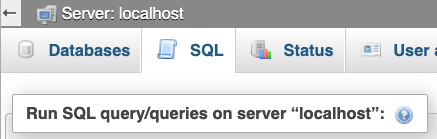
Make sure you are inside the root of your localhost, then select the SQL tab:
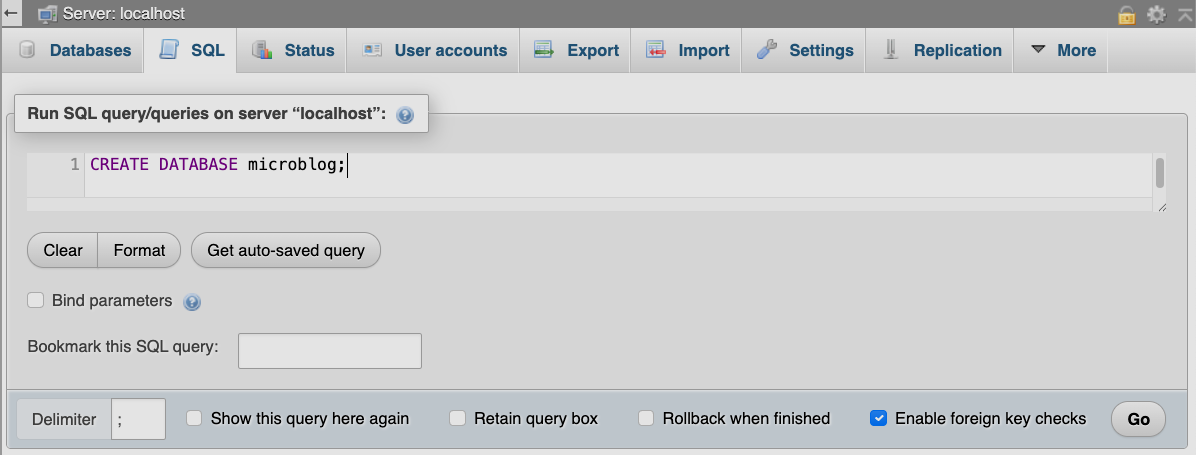
To perform SQL queries you enter the SQL code inside the text editor, then press the Go button in the bottom right corner.
You should see this success message:

Now we want to create a user to manage this database, navigate back to the SQL tab and execute the following query. This will create a user ‘microblog’ with the password ‘password’ and grant all privileges to the microblog database and all its tables:
grant all on microblog.* to 'microblog'@'localhost' identified by 'password';
We can now perform the rest of the queries to create the neccessary tables.
But first we need to navigate to the microblog database, make sure the path is like the picture, also select the SQL tab:

We want to create the following tables:
- auth_user (to allow authentication, save posts, likes, and comments)
- post
- post_like
- post_comment
- follow
auth_user:
create table auth_user (
    -- specify an id column that auto increments
	id INT AUTO_INCREMENT NOT NULL,
    -- we make sure the email is unique on the database level
    email VARCHAR(255) UNIQUE NOT NULL,
    -- we will only store a hashed version of the password
    password_hash VARCHAR(255) NOT NULL,
    -- and finnaly set the id column to the primary key
    PRIMARY KEY (id)
);
post:
CREATE TABLE post (
    id INT AUTO_INCREMENT NOT NULL,
    -- post content with specified length
    content VARCHAR(255) NOT NULL,
    -- the creator of the post, will point to a user
    auth_user INT NOT NULL,
    PRIMARY KEY (id),
    -- foreign key assignment for the auth_user
    FOREIGN KEY (auth_user) REFERENCES auth_user(id)
);
post_like:
CREATE TABLE post_like (
    id INT AUTO_INCREMENT NOT NULL,
    post INT,
    auth_user INT,
    PRIMARY KEY (id),
    FOREIGN KEY (post) REFERENCES post(id),
    FOREIGN KEY (auth_user) REFERENCES auth_user(id),
    -- we make sure to put a unique constraint
    -- this allows a user to like a post 1 time
    CONSTRAINT uc_like_auth_user UNIQUE (post, auth_user)
);
post_comment:
CREATE TABLE post_comment (
    id INT NOT NULL AUTO_INCREMENT,
    content VARCHAR(255) NOT NULL,
    post INT NOT NULL,
    auth_user INT NOT NULL,
    PRIMARY KEY (id),
    FOREIGN KEY (post) REFERENCES post(id),
    FOREIGN KEY (auth_user) REFERENCES auth_user(id)
    -- a user may comment a post multiple times
);
follow:
CREATE TABLE follow (
    id INT AUTO_INCREMENT NOT NULL,
    follower INT,
    -- users may not follow themselves
    followed INT CHECK (followed != follower),
    PRIMARY KEY (id),
    FOREIGN KEY (follower) REFERENCES auth_user(id),
    FOREIGN KEY (followed) REFERENCES auth_user(id),
    -- users may follow each other only one time
    CONSTRAINT uc_follower_followed UNIQUE (follower, followed)
);
If you need to ALTER a table, just know that it is as straight forward as creating a table.
And if you need to DROP a table, then it is even easier!
DELETE is basically the same, just performed on a row.
Let’s add some entries!
add 2 rows to the auth_user table:
INSERT INTO auth_user (email, password_hash)
VALUES ("email@example.com", "unhashed_password");
-- you may add as many queries you like separated with a semicolon
INSERT INTO auth_user (email, password_hash)
VALUES ("email2@example.com", "unhashed_password");
add a post:
INSERT INTO post (content, auth_user)
VALUES ("This is post content!", 1);
add a follow:
INSERT INTO follow (follower, followed)
VALUES (2, 1);
add a like:
INSERT INTO post_like (post, auth_user)
VALUES (1, 2);
add a comment:
INSERT INTO post_comment (content, post, auth_user)
VALUES ("This is a post comment!", 1, 2);
Good job!
Take some time and add as much data as you like, it could perhaps be more educational to add a few rows to each table, that way you may experiment with fetching it all.
Let’s fetch the newly created data:
The SELECT statement is used to fetch data from the database.
-- selects all columns and returns all rows
SELECT * FROM auth_user;
-- we may also explicitly select all columns
SELECT id, email, password_hash FROM auth_user;
-- or just specific columns
SELECT email FROM auth_user;
The WHERE statement can be used together with SELECT to filter out specific entries.
-- we can fetch a specific entry using the WHERE statement
SELECT * FROM auth_user WHERE id = 1;
-- with explicit column selection
SELECT id, email, password_hash FROM auth_user WHERE id = 1;
-- again selecting specific columns
SELECT email FROM auth_user WHERE id = 1;
Another way to fetch multiple related entries is to JOIN them thorugh their FOREIGN KEY:
-- this will join the two tables and return all the posts fore each auth_user
SELECT * FROM auth_user JOIN post ON auth_user.id = post.auth_user;
-- you may also mix it with the WHERE statement,
-- this will join the two tables and return all the posts for a specific auth_user
SELECT * FROM auth_user
JOIN post
ON auth_user.id = post.auth_user
WHERE auth_user.id = 1;
-- you may also use functions like COUNT to count the amount of likes a post have
-- this returns only the number of likes for the specific post
SELECT COUNT(*) FROM post_like WHERE post = 1;
-- this will return all the combined likes for all posts of specific auth_user
SELECT COUNT(*) FROM post_like
JOIN post
ON post_like.post = post.id
WHERE post.auth_user = 1;
As you can tell this is the strength of relational databases!
Next, PHP!
We want to create a simple web application that takes user input through form data then saves it to the database. This is a perfect job for PHP, with built in support for all the necessary steps. The goal is to keep it simple, and not focus on any design.
To start, we create the database connection.
PHP has built in support for SQL DBMS’s (Database Management System) through PDO. We are using MySQL, and will use the MySQL PDO Driver.
Let’s start simple and just fetch some data from the database and echo it to the browser.
First of all, we need to setup the project so that the php web environment can pick it up. That is inside the XAMPP htdocs directory! On my machine it is located at: /Applications/XAMPP/htodcs/ but you might have a different setup.
Create a new directory microblog and create a file index.php inside it.
Now your project will be available through visiting your browser and navigating to: http://localhost/microblog for now, it is just a blank page!
We create a database connection following the official documentation. Do not worry about closing the connection, this is nothing we need to do manually, unless we have a specific reason.
We use PDO::setAttribute to change the default return type to object instead of array.
Inside index.php:
<?php
// $dbh = "database handler" is the documented naming convention
// we provide the database credentials we gave our database at the create step
$dbh = new PDO('mysql:host=localhost;dbname=microblog', 'microblog', 'password');
// this sets the attribute for the default return type, in this case: object
$dbh->setAttribute(PDO::ATTR_DEFAULT_FETCH_MODE, PDO::FETCH_OBJ);
I recommend to always use the PDO::prepare method to safely perform SQL queries, even if you do not plan to add any parameters, this way you always know you are playing it safe.
This method can be used to safely parse user provided data into SQL safe parameters.
It is never a good idea to allow the client/user to provide entire SQL query strings, but when using the prepare method, it is safe to allow the client/user to provide parameters like auth_user id’s, to fetch specific users.
// $sth = "statement handler" is the official naming convention
// this prepares the SQL statement and will allow for parameters
$sth_without_params = $dbh->prepare('SELECT * FROM auth_user');
// since this statment does not have any params we just execute
$sth_without_params->execute();
// and fetch the recieved data, with fetchAll to fetch all rows
$sth_without_params->fetchAll();
// use var_dump() to print the entire content of the returned object
var_dump($result_without_params);
// you may access each of the included objects and its attributes
echo $result_without_params[0]->id;
echo $result_without_params[0]->email;
echo $result_without_params[0]->password_hash;
// this time we use some parameters to fetch a specific row
$sth_with_params = $dbh->prepare('SELECT * FROM auth_user WHERE id = :id');
// then perform the execute, at the same time add the parameter data
$sth_with_params->execute(["id" => 1]);
// we then fetch the object
$result_with_params = $sth_with_params->fetch();
// and use var_dump() to display it
var_dump($result_with_params);
// also access each of the objects attributes
echo $result_with_params->id;
echo $result_with_params->email;
echo $result_with_params->password_hash;
With these tools you may play around and try to add, fetch, alter, and delete data. It is the same SQL commands as in the DBMS.
We later remove most of this code, and move the database connection to a seperate file.
Time to build the actual project
this is the final tree structure:
.
├── components
│   ├── comments.php
│   ├── footer.php
│   ├── head.php
│   └── posts.php
├── create_post.php
├── edit_post.php
├── functions
│   ├── change_password.php
│   ├── comment.php
│   ├── db.php
│   ├── follow.php
│   ├── like.php
│   ├── logout.php
│   ├── sql.php
│   ├── unfollow.php
│   └── unlike.php
├── index.php
├── login.php
├── post.php
├── profile.php
├── signup.php
└── styles.css
Begin moving the database connection to its own file functions/db.php:
<?php

$dbh = new PDO('mysql:host=127.0.0.1;dbname=microblog', 'microblog', 'password');
$dbh->setAttribute(PDO::ATTR_DEFAULT_FETCH_MODE, PDO::FETCH_OBJ);
Create a file to write all of our SQL functions functions/sql.php:
<?php

/* =========================
   1. Authentication / Users
   ========================= */

function email_exists($dbh, $email)
{
    $email_exists_sql =
        "SELECT email
         FROM auth_user
         WHERE auth_user.email = :email";
    $email_exists_sth = $dbh->prepare($email_exists_sql);
    $email_exists_sth->execute(["email" => $email]);
    return $email_exists_sth->rowCount();
}

function fetch_user_to_login($dbh, $login_email)
{
    $login_sql =
        "SELECT
            id,
            email,
            password_hash
         FROM auth_user
         WHERE email = :login_email";
    $login_sth = $dbh->prepare($login_sql);
    $login_sth->execute([
        "login_email" => $login_email,
    ]);
    return $login_sth->fetch();
}

function create_user($dbh, $email, $password_hash)
{
    $create_user_sql =
        "INSERT INTO auth_user
            (email, password_hash)
         VALUES (:email, :password_hash)";
    $create_user_sth = $dbh->prepare($create_user_sql);
    $create_user_sth->execute([
        "email" => $email,
        "password_hash" => $password_hash
    ]);

    $created_user_sql =
        "SELECT id, email
         FROM auth_user
         WHERE email = :email";
    $created_user_sth = $dbh->prepare($created_user_sql);
    $created_user_sth->execute(["email" => $email]);
    return $created_user_sth->fetch();
}

function change_password($dbh, $auth_user_id, $new_password)
{
    $change_password_sql =
        "UPDATE auth_user
         SET auth_user.password_hash = :new_password
         WHERE auth_user.id = :auth_user_id";
    $change_password_sth = $dbh->prepare($change_password_sql);
    $change_password_sth->execute([
        "auth_user_id" => $auth_user_id,
        "new_password" => $new_password
    ]);
    return $change_password_sth->rowCount();
}


/* =========================
   2. Profiles & Follows
   ========================= */

function fetch_profile_user($dbh, $profile_user_id)
{
    $profile_sth = $dbh->prepare(
        "SELECT
            id,
            email
         FROM auth_user
         WHERE id = :id"
    );
    $profile_sth->execute(["id" => $profile_user_id]);
    return $profile_sth->fetch();
}

function fetch_profile_posts($dbh, $profile_user_id)
{
    $posts_sth = $dbh->prepare(
        "SELECT
            post.id AS post_id,
            post.title,
            post.content,
            post.created_at,
            auth_user.id AS auth_user_id,
            auth_user.email
         FROM post
         LEFT JOIN auth_user
            ON post.auth_user = auth_user.id
         WHERE post.auth_user = :profile_user_id
         ORDER BY post.created_at DESC"
    );
    $posts_sth->execute(["profile_user_id" => $profile_user_id]);
    return $posts_sth->fetchAll();
}

function fetch_followers($dbh, $profile_user_id)
{
    $followers_sql =
        "SELECT COUNT(*)
         FROM follow
         WHERE followed = :profile_user_id";
    $followers_sth = $dbh->prepare($followers_sql);
    $followers_sth->execute([
        "profile_user_id" => $profile_user_id
    ]);
    return $followers_sth->fetchColumn();
}

function current_user_is_following($dbh, $auth_user_id, $profile_user_id)
{
    $sth = $dbh->prepare(
        "SELECT follow.follower
         FROM follow
         WHERE followed = :profile_user_id
           AND follower = :auth_user_id"
    );
    $sth->execute([
        "profile_user_id" => $profile_user_id,
        "auth_user_id" => $auth_user_id
    ]);
    return $sth->rowCount();
}

function create_follow($dbh, $auth_user_id, $profile_user_id)
{
    $follow_sql =
        "INSERT INTO follow
            (follower, followed)
         VALUES (:auth_user_id, :profile_user_id)";
    $follow_sth = $dbh->prepare($follow_sql);
    $follow_sth->execute([
        "auth_user_id" => $auth_user_id,
        "profile_user_id" => $profile_user_id
    ]);
    return $follow_sth->rowCount();
}

function create_unfollow($dbh, $auth_user_id, $profile_user_id)
{
    $unfollow_sql =
        "DELETE FROM follow
         WHERE follower = :auth_user_id
           AND followed = :profile_user_id";
    $unfollow_sth = $dbh->prepare($unfollow_sql);
    $unfollow_sth->execute([
        "auth_user_id" => $auth_user_id,
        "profile_user_id" => $profile_user_id
    ]);
    return $unfollow_sth->rowCount();
}


/* =========================
   3. Posts
   ========================= */

function fetch_posts($dbh)
{
    $posts_sth = $dbh->prepare(
        "SELECT
            post.id AS post_id,
            post.title,
            post.content,
            post.created_at,
            auth_user.id AS auth_user_id,
            auth_user.email
         FROM post
         LEFT JOIN auth_user
            ON post.auth_user = auth_user.id
         ORDER BY post.created_at DESC"
    );
    $posts_sth->execute();
    return $posts_sth->fetchAll();
}

function fetch_post($dbh, $post_id)
{
    $post_sql =
        "SELECT
            post.id AS post_id,
            post.title,
            post.content,
            post.created_at,
            auth_user.id AS auth_user_id,
            auth_user.email
         FROM post
         LEFT JOIN auth_user
            ON post.auth_user = auth_user.id
         WHERE post.id = :post_id";
    $post_sth = $dbh->prepare($post_sql);
    $post_sth->execute(["post_id" => $post_id]);
    return $post_sth->fetch();
}

function fetch_post_to_edit($dbh, $auth_user_id, $post_id)
{
    $post_to_edit_sql =
        "SELECT
            post.id AS post_id,
            post.title,
            post.auth_user,
            post.content,
            auth_user.id AS auth_user_id
         FROM post
         LEFT JOIN auth_user
            ON post.auth_user = auth_user.id
         WHERE post.id = :post_id
           AND auth_user.id = :auth_user_id";
    $sth = $dbh->prepare($post_to_edit_sql);
    $sth->execute([
        "post_id" => $post_id,
        "auth_user_id" => $auth_user_id
    ]);
    return $sth->fetch();
}

function create_post($dbh, $auth_user_id, $post_title, $post_content)
{
    $create_post_sql =
        "INSERT INTO post
            (auth_user, title, content)
         VALUES (:auth_user, :post_title, :post_content)";
    $sth = $dbh->prepare($create_post_sql);
    $sth->execute([
        "auth_user" => $auth_user_id,
        "post_title" => $post_title,
        "post_content" => $post_content
    ]);
    return $sth->rowCount();
}

function edit_post($dbh, $auth_user_id, $post_id, $post_title, $post_content)
{
    $edit_post_sql =
        "UPDATE post
         SET title = :post_title,
             content = :post_content
         WHERE id = :post_id
           AND auth_user = :auth_user_id";
    $sth = $dbh->prepare($edit_post_sql);
    $sth->execute([
        "post_id" => $post_id,
        "post_title" => $post_title,
        "post_content" => $post_content,
        "auth_user_id" => $auth_user_id
    ]);
    return $sth->rowCount();
}


/* =========================
   4. Post Likes
   ========================= */

function fetch_likes($dbh, $post_id)
{
    $sth = $dbh->prepare(
        "SELECT COUNT(*)
         FROM post_like
         WHERE post = :post_id"
    );
    $sth->execute(["post_id" => $post_id]);
    return $sth->fetchColumn();
}

function current_user_has_liked($dbh, $auth_user_id)
{
    $sth = $dbh->prepare(
        "SELECT auth_user
         FROM post_like
         WHERE auth_user = :auth_user_id"
    );
    $sth->execute(["auth_user_id" => $auth_user_id]);
    return $sth->rowCount();
}

function create_post_like($dbh, $post_id, $auth_user_id)
{
    $sql =
        "INSERT INTO post_like
            (post, auth_user)
         VALUES (:post_id, :auth_user_id)";
    $sth = $dbh->prepare($sql);
    $sth->execute([
        "post_id" => $post_id,
        "auth_user_id" => $auth_user_id
    ]);
    return $sth->rowCount();
}

function create_post_unlike($dbh, $post_id, $auth_user_id)
{
    $sql =
        "DELETE FROM post_like
         WHERE post = :post_id
           AND auth_user = :auth_user_id";
    $sth = $dbh->prepare($sql);
    $sth->execute([
        "post_id" => $post_id,
        "auth_user_id" => $auth_user_id
    ]);
    return $sth->rowCount();
}


/* =========================
   5. Comments
   ========================= */

function fetch_comments($dbh, $post_id)
{
    $comments_sql =
        "SELECT
            post_comment.content,
            post_comment.created_at,
            auth_user.email
         FROM post_comment
         LEFT JOIN auth_user
            ON post_comment.auth_user = auth_user.id
         WHERE post_comment.post = :post_id";
    $sth = $dbh->prepare($comments_sql);
    $sth->execute(["post_id" => $post_id]);
    return $sth->fetchAll();
}

function create_comment($dbh, $auth_user_id, $post_id, $content)
{
    $sth = $dbh->prepare(
        "INSERT INTO post_comment
            (auth_user, post, content)
         VALUES (:auth_user_id, :post_id, :content)"
    );
    $sth->execute([
        "auth_user_id" => $auth_user_id,
        "post_id" => $post_id,
        "content" => $content
    ]);
    return $sth->rowCount();
}
Now lay out the basic HTML templating in components/head.php, components/footer.php, components/posts.php, and components/comments.php:
components/head.php:
<!DOCTYPE html>
<html lang="en">

<head>
    <meta charset="UTF-8">
    <meta name="viewport" content="width=device-width, initial-scale=1.0">
    <link rel="stylesheet" href="styles.css">
    <title>microblog - <?= $title ?></title>
</head>

<body>
    <nav>
        <ul>
            <a href="/microblog/index.php">
                <li>
                    <!-- this is the index page with all the different profiles -->
                    Home
                </li>
                <?php if (empty($_SESSION["auth_user"])): ?>
                    <a href="/microblog/signup.php">
                        <li>
                            <!-- this is the signup page -->
                            Signup
                        </li>
                    </a>
                    <a href="/microblog/login.php">
                        <!-- this should redirect to the login page -->
                        <li>Login</li>
                    </a>
                <?php else: ?>
                    <a href="/microblog/profile.php?id=<?= $_SESSION["auth_user"]->id ?>">
                        <li>
                            <!-- this redirects to the logged in users profile page -->
                            Profile
                        </li>
                    </a>
                    <form action="/microblog/functions/logout.php" method="post">
                        <!-- this should send a post request to the logout function -->
                        <input type="submit" value="Logout">
                    </form>
                <?php endif; ?>
            </a>
        </ul>
    </nav>
    <!-- body end-tag is rendered inside the footer.php module -->
components/footer.php:
<div>
    <p>This is the footer © microblog</p>
</div>
</body>

</html>
components/posts.php:
<div class="posts-section">
    <?php foreach ($posts as $post): ?>
        <div class="post-card">
            <p><?= $post->post_id ?></p>
            <p><?= $post->title ?></p>
            <p><?= $post->content ?></p>
            <p><?= $post->created_at ?></p>
            <p><?= $post->email ?></p>
            <a href="/microblog/post.php?id=<?= $post->post_id ?>">View post</a>
            <?php if ($auth_user_is_owner): ?>
                <a href="/microblog/edit_post.php?id=<?= $post->post_id ?>">Edit post</a>
            <?php endif ?>
        </div>
    <?php endforeach ?>
</div>
components/comments.php:
<div class="comment-section">
    <?php if ($comments): ?>
        <p>Comments:</p>
        <?php foreach ($comments as $comment): ?>
            <div class="comment-card">
                <p><?= htmlspecialchars($comment->content) ?></p>
                <p><?= $comment->created_at ?></p>
                <p><?= $comment->email ?></p>
            </div>
        <?php endforeach ?>
    <?php endif ?>

    <?php if ($auth_user): ?>
        <form action="/microblog/functions/comment.php" method="post">
            <div>
                <input type="text" name="comment-post-id" value="<?= $post_id ?>" hidden>
                <label for="comment-content">Add your comment</label>
                <textarea name="comment-content" id="comment-content"></textarea>
            </div>
            <input type="submit" value="Add comment">
        </form>
    <?php else: ?>
        <p><a href="login.php">Login</a> to comment on the post</p>
    <?php endif ?>
</div>
Now let’s add the functions/ beside db.php and sql.php:
functions/logout.php:
<?php

session_start();

if (!$_SESSION["auth_user"]) {
    header(header: "Location: http://localhost:8080/microblog/index.php");
    die();
}

$_SESSION = array();

if (ini_get("session.use_cookies")) {
    $params = session_get_cookie_params();
    setcookie(
        session_name(),
        "",
        time() - 42000,
        $params["path"],
        $params["domain"],
        $params["secure"],
        $params["httponly"]
    );
}

session_destroy();

header(header: "Location: http://localhost:8080/microblog/index.php");
functions/change_password.php:
<?php

session_start();

if ($_SESSION["auth_user"] && $_SERVER["REQUEST_METHOD"] == "POST") {

    include "db.php";
    include "sql.php";

    $auth_user_id = $_SESSION["auth_user"]->id;
    $new_password = $_POST["change-password-input"];

    $success = change_password($dbh, $auth_user_id, $new_password);

    if ($success) {
        header(header: "Location: http://localhost:8080/microblog/profile.php?id=$auth_user_id");
    } else {
        die("Failed to change password");
    }

} else {
    die("Unauthorized");
}
functions/like.php:
<?php

session_start();

if ($_SESSION["auth_user"] && $_SERVER["REQUEST_METHOD"] == "POST") {
    include "db.php";
    include "sql.php";

    $post_id = $_POST["like-post-id"];
    $auth_user_id = $_SESSION["auth_user"]->id;

    $has_liked = current_user_has_liked($dbh, $auth_user_id);

    // check if user likes post
    if($has_liked) {
        die("Cannot like since already liked");
    }

    $success = create_post_like($dbh, $post_id, $auth_user_id);

    if($success) {
        header(header: "Location: http://localhost:8080/microblog/post.php?id=$post_id");
    } else {
        echo "failed to like post";
    }
} else {
    die("Unathorized");
}
functions/unlike.php:
<?php

session_start();

if ($_SESSION["auth_user"] && $_SERVER["REQUEST_METHOD"] == "POST") {
    include "db.php";
    include "sql.php";

    $post_id = $_POST["like-post-id"];
    $auth_user_id = $_SESSION["auth_user"]->id;

    $has_liked = current_user_has_liked($dbh, $auth_user_id);

    // check if user likes post
    if(!$has_liked) {
        die("Cannot remove like since there is none");
    }

    $success = create_post_unlike($dbh, $post_id, $auth_user_id);

    if($success) {
        header(header: "Location: http://localhost:8080/microblog/post.php?id=$post_id");
    } else {
        echo "failed to like post";
    }
} else {
    die("Unathorized");
}
functions/follow.php:
<?php

session_start();

if ($_SESSION["auth_user"] && $_SERVER["REQUEST_METHOD"] == "POST") {
    include "db.php";
    include "sql.php";

    $profile_user_id = $_POST["profile-user-id"];
    $auth_user_id = $_SESSION["auth_user"]->id;

   $current_user_is_following = current_user_is_following(
        $dbh,
        $auth_user_id,
        $profile_user_id
    );

    // check if user is following
    if($current_user_is_following) {
        die("Cannot follow since already following");
    }

    $success = create_follow($dbh, $auth_user_id, $profile_user_id);

    if($success) {
        header(header: "Location: http://localhost:8080/microblog/profile.php?id=$profile_user_id");
    } else {
        echo "failed to follow";
    }
} else {
    die("Unathorized");
}
functions/unfollow.php:
<?php

session_start();

if ($_SESSION["auth_user"] && $_SERVER["REQUEST_METHOD"] == "POST") {
    include "db.php";
    include "sql.php";

    $profile_user_id = $_POST["profile-user-id"];
    $auth_user_id = $_SESSION["auth_user"]->id;

   $current_user_is_following = current_user_is_following(
        $dbh,
        $auth_user_id,
        $profile_user_id
    );

    // check if user is following
    if(!$current_user_is_following) {
        die("Cannot unfollow since already not following");
    }

    $success = create_unfollow($dbh, $auth_user_id, $profile_user_id);

    if($success) {
        header(header: "Location: http://localhost:8080/microblog/profile.php?id=$profile_user_id");
    } else {
        echo "failed to follow";
    }
} else {
    die("Unathorized");
}
functions/comment.php:
<?php

session_start();

if ($_SESSION["auth_user"] && $_SERVER["REQUEST_METHOD"] == "POST") {
    include "db.php";
    include "sql.php";

    $auth_user_id = $_SESSION["auth_user"]->id;
    $post_id = $_POST["comment-post-id"];
    $content = $_POST["comment-content"];

    $create_comment_sql =
    "INSERT INTO post_comment
        (auth_user, post, content)
    VALUES (:auth_user_id, :post_id, :content)
    ";

    $create_comment_sth = $dbh->prepare($create_comment_sql);

    $success = $create_comment_sth->execute([
        "auth_user_id" => $auth_user_id,
        "post_id" => $post_id,
        "content" => $content
    ]);

    // make better error handling
    if ($success) {
        header(header: "Location: http://localhost:8080/microblog/post.php?id=$post_id");
    } else {
        echo "falied to add comment";
    }

} else {
    die("Unauthorized");
}
Then the page logics, create the index.php page:
<?php

session_start();

include "functions/db.php";
include "functions/sql.php";

$posts = fetch_posts($dbh);

$title = "Home Page";
include 'components/head.php';
?>

<h1>Welcome to microblog!</h1>

<?php if ($posts): ?>
    <?php include "components/posts.php" ?>
<?php else: ?>
    <div>
        <p>
            <a href="login.php">Login</a> or <a href="signup.php">signup</a> to write the first post
        </p>
    </div>
<?php endif ?>
<?php include 'components/footer.php'; ?>
Then the signup and login pages
signup.php:
<?php

session_start();

if ($_SESSION["auth_user"]) {
    header(header: "Location: http://localhost:8080/microblog/index.php");
    die();
}

if ($_SERVER["REQUEST_METHOD"] == "POST") {

    include "functions/db.php";
    include "functions/sql.php";

    $signup_email = $_POST["signup-email"];
    $signup_password = $_POST["signup-password"];

    $email_exists = email_exists($dbh, $signup_email);

    var_dump($email_exists);

    if (!$email_exists) {
        // hash password
        $password_hash = password_hash($signup_password, PASSWORD_DEFAULT);

        $created_user = create_user($dbh, $signup_email, $password_hash);
        if ($created_user) {
            $_SESSION["auth_user"] = $created_user;
            header(header: "Location: http://localhost:8080/microblog/profile.php?id=$created_user->id");
        } else {
            die("Failed to create user!");
        }
    } else {
        die("Email already taken!");
    }
}

$title = "Signup Page";
include 'components/head.php';
?>

<h1>Signup for an account:</h1>
<form action="/microblog/signup.php" method="post">
    <div>
        <label for="signup-email">Email:</label>
        <input type="email" name="signup-email" id="signup-email">
    </div>
    <div>
        <label for="signup-password">Password:</label>
        <input type="password" name="signup-password" id="signup-password">
    </div>
    <div>
        <button type="submit">Signup</button>
    </div>
</form>

<?php
include 'components/footer.php';
?>
login.php:
<?php

session_start();

if ($_SESSION["auth_user"]) {
    header(header: "Location: http://localhost:8080/microblog/index.php");
    die();
}

if ($_SERVER["REQUEST_METHOD"] == "POST") {

    include "functions/db.php";
    include "functions/sql.php";

    $login_email = $_POST["login-email"];
    $login_password = $_POST["login-password"];

    $email_exists = email_exists($dbh, $login_email);
    if ($email_exists) {

        $auth_user = fetch_user_to_login($dbh, $login_email, $login_password);

        if (
            // verify password with password_hash
            password_verify($login_password, $auth_user->password_hash)
            && $auth_user
        ) {
            // set session with logged in user
            $_SESSION["auth_user"] = $auth_user;
            header(header: "Location: http://localhost:8080/microblog/profile.php?id=$auth_user->id");
        } else {
            die("Wrong password!");
        }
    } else {
        die("Invalid email");
    }
}

$title = "Login Page | $username";
include 'components/head.php';
?>

<h1>Login to your account:</h1>
<form action="/microblog/login.php" method="post">
    <div>
        <label for="login-email">Email:</label>
        <input type="email" name="login-email" id="login-email">
    </div>
    <div>
        <label for="login-password">Password:</label>
        <input type="password" name="login-password" id="login-password">
    </div>
    <div>
        <button type="submit">Login</button>
    </div>
</form>

<?php include 'components/footer.php'; ?>
profile.php:
<?php

session_start();

include "functions/db.php";
include "functions/sql.php";

$auth_user = $_SESSION["auth_user"];

$profile_user = fetch_profile_user($dbh, $_GET["id"]);
if (!$profile_user) {
    die("User does not exist!");
}

$followers = fetch_followers($dbh, $profile_user->id);

$posts = fetch_profile_posts($dbh, $profile_user->id);

$auth_user_is_owner = $auth_user && $auth_user->id == $profile_user->id ? true : false;

$follow = "/microblog/functions/follow.php";
$unfollow = "/microblog/functions/unfollow.php";

$current_user_is_following = current_user_is_following(
    $dbh,
    $auth_user->id,
    $profile_user->id
);

$title = "Profile of $profile_user->email";
include 'components/head.php';
?>

<h1><?= $profile_user->email ?></h1>

<!-- followers section -->
<p>Followers: <?= $followers ?></p>
<?php if(!$auth_user_is_owner): ?>
    <form action="<?= !$current_user_is_following ? $follow : $unfollow ?>" method="post">
        <input type="text" name="profile-user-id" value="<?= $profile_user->id ?>" hidden>
        <input type="submit" value="<?= !$current_user_is_following ? 'Follow' : 'Unfollow' ?>">
    </form>
<?php endif ?>

<!-- profile dashboard -->
<?php if($auth_user_is_owner): ?>
    <div>
        <div>
            <p>Change your password:</p>
            <form action="/microblog/functions/change_password.php" method="post">
                <label for="change-password-input">New password:</label>
                <input type="password" name="change-password-input">
                <input type="submit" value="Change password">
            </form>
        </div>
        <div>
            <p>
                <a href="/microblog/create_post.php">Create new post</a>
            </p>
        </div>
    </div>
<?php endif ?>

<?php if ($posts): ?>
    <?php include "components/posts.php" ?>
<?php endif ?>

<?php include 'components/footer.php'; ?>
create_post.php:
<?php

session_start();

if (!$_SESSION["auth_user"]) {
    header(header: "Location: http://localhost:8080/microblog/login.php");
    die();
}
$title = "Create Post";

if ($_SERVER["REQUEST_METHOD"] == "POST") {

    include "functions/db.php";
    include "functions/sql.php";

    $auth_user_id = $_SESSION["auth_user"]->id;
    $post_title = $_POST["post-title"];
    $post_content = $_POST["post-content"];

    $success = create_post($dbh, $auth_user_id, $post_title, $post_content);

    if ($success) {
        $last_inserted_id = $dbh->lastInsertId();
        header(header: "Location: http://localhost:8080/microblog/post.php?id=$last_inserted_id");

    }
}

include 'components/head.php';
?>

<h1>Create Post</h1>
<form action="/microblog/create_post.php" method="post">
    <div>
        <label for="post-title">Title:</label>
        <input type="text" name="post-title" id="post-title">
    </div>
    <div>
        <label for="post-content">Content:</label>
        <textarea name="post-content" id="post-content"></textarea>
    </div>
    <button type="submit">Create Post</button>
</form>

<?php
include 'components/footer.php';
?>
edit_post.php:
<?php

session_start();

if (!$_SESSION["auth_user"]) {
    header(header: "Location: http://localhost:8080/microblog/login.php");
    die();
}

include "functions/db.php";
include "functions/sql.php";

if ($_SESSION["auth_user"] && $_SERVER["REQUEST_METHOD"] == "GET") {
    $post_id = $_GET["id"];
    $auth_user_id = $_SESSION["auth_user"]->id;

    $post = fetch_post_to_edit($dbh, $auth_user_id, $post_id);

    if (!$post) {
        die("Unauthorized access");
    }
} elseif ($_SESSION["auth_user"] && $_SERVER["REQUEST_METHOD"] == "POST") {
    $auth_user_id = $_SESSION["auth_user"]->id;
    $post_id = $_POST["edit-post-id"];
    $post_title = $_POST["edit-post-title"];
    $post_content = $_POST["edit-post-content"];

    $post_edited = edit_post(
        $dbh,
        $auth_user_id,
        $post_id,
        $post_title,
        $post_content
    );

    if ($post_edited) {
        header(header: "Location: http://localhost:8080/microblog/post.php?id=$post_id");
    } else {
        die("Failed to edit post");
    }
}

$title = "Edit Post";
include 'components/head.php';
?>

<h1>Edit Post</h1>
<form action="/microblog/edit_post.php" method="post">
    <input type="text" name="edit-post-id" id="edit-post-id" value="<?= $post->post_id ?>" hidden>
    <div>
        <label for="edit-post-title">Title:</label>
        <input type="text" name="edit-post-title" id="edit-post-title" value="<?= $post->title ?>">
    </div>
    <div>
        <label for="edit-post-content">Content:</label>
        <textarea name="edit-post-content" id="edit-post-content">
            <?= $post->content ?>
        </textarea>
    </div>
    <button type="submit">Save Post</button>
</form>

<?php
include 'components/footer.php';
?>
Good job!
Oh, btw. some styling in styles.css ^^
.posts-section,
.comment-section {
    padding: 1rem;
    margin-top: 1rem;
    border: 1px solid black;
    display: flex;
    flex-direction: column;
    gap: 1rem;
}

.post-card,
.comment-card {
    padding: 1rem;
    border: 1px solid black;
}

textarea {
    width: 100%;
}